How to recover your deleted photos for free with Stellar Photo Recovery
Recover lost photos, videos, or music files each up to 100MB at no cost
You have just celebrated Christmas or a wedding with your family, took dozens of heartfelt photos on your camera or smartphone and later that day you delete them accidentally. Imagine this situation. Your heart just sinks. Digital files are all too easy to lose and if you don’t have the right recovery software by your side, those files will be gone for ever. In moments like these, panic just sets in. But don’t worry – Stellar Photo Recovery shall come to your rescue. It shall let you quickly scan drives and recover lost photos, videos, or music files each up to 100 MB at no cost. Simply put, the software can bring back your precious memories with ease. Let’s now understand how it works and what it does.
What are the key features of Stellar Free Photo Recovery?
Stellar Photo Recovery is like a safety net for your photos and videos. It runs on both Windows and Mac systems and here are its prime features:
- Quick and Easy Scan: Stellar’s simple wizard guides you in a few clicks. The whole process is quick and straightforward. You just select the data type (photos, videos, audio or all data), pick the drive and hit Scan. The software then digs through the disk fast to find deleted files. You can even pause and resume a scan if needed. This means you don’t need technical skills… even beginners can recover files quickly.
- Supports Windows & Mac: Available for Windows (11,10,8.1/8) and macOS, Stellar Free Photo Recovery works on most of those desktop and laptop computers. This cross-platform support makes it easy for anyone to try the free recovery, whether you’re using a PC or a Mac. There are also companion apps for iPhone/Android for photo recovery.
- Wide Format Compatibility: The software recovers almost all photo, video and audio formats. It has the support for camera RAW files like Canon .CRW, Nikon .NEF, Sony .ARW, Fujifilm .RAF, etc. Those standard image types like JPEG, TIFF, PNG, GIF, PSD, and many more are supported here. It also can handle major video formats like MP4, AVI, MKV, MOV, MPEG, WMV, etc. and audio files like MP3, WAV, MIDI, M4A etc. This level of broad compatibility makes sure that your phone or camera format is almost certainly covered.
- Built-in Preview: Before you save any recovered file, you can preview it really easy. Stellar’s interface shall let you browse through your found files and see thumbnails or full-screen previews of those photos and videos. For example, while a scan is running still… you can click on a photo thumbnail to display it. This way you confirm you are recovering the right images and avoiding to save unwanted files.
- User-Friendly Interface: Stellar Photo Recovery offers a very clean intuitive UI. It even has theme options as well like Dark, Light or Vibrant to suit your taste. The menus and buttons are labeled in a clear manner and that step-by-step wizard leads you through recovery. In short, you won’t get lost… the software walks you through the process step by step, making it easy for anyone to use.
Each of these features is built into the free version of Stellar Photo Recovery. You get all the scanning power and ease-of-use at no cost so you can attempt to restore your pictures.
How to recover deleted photos: Step-by-step
Stellar makes the recovery process as simple as 1-2-3.
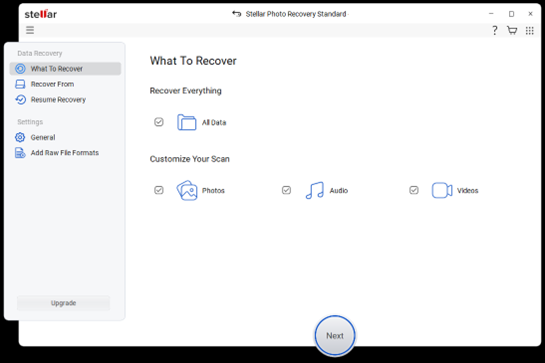
Step 1- Select File Type: Launch the software and tell it what to recover. On the “What To Recover” screen (see above), you can choose All Data or specify only Photos, Videos, or Audio. For example, checking Photos will focus the scan on image files only. After selecting, click Next at the bottom. This quick selection helps the program target just the types of files you want to restore.
 Just check the box next to the device that had your deleted photos.
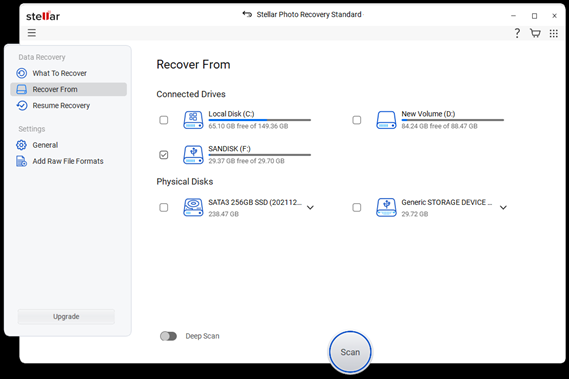
Step 2 - Select Recover From: Select the drive or folder that you want to be scanned. In the “Recover From” screen, the tool lists all connected drives like internal disks, USB sticks, memory cards etc. Just check the box next to the device that had your deleted photos. Then click the big Scan button right at the bottom. The software will start scanning that drive of yours for deleted media. There is also an option for a Deep Scan toggle if your files are hard to find but remember that the normal scan is faster.
 Click ‘Recover’ to restore them to a safe location on your computer.
Step 3- Preview and Recover: Once that scan finishes, the tool shall be displaying those found files in folders and lists. You can then browse through them and click on any photo to see a larger preview. Now just check those boxes next to the images or videos/music that you want to save. Then click ‘Recover’ to restore them to a safe location on your computer.
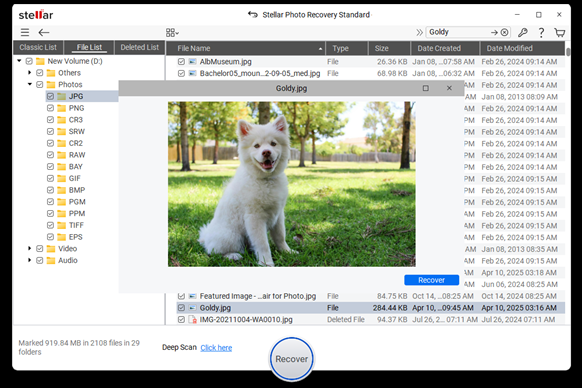 Stellar restores the selected photos and you’ve successfully brought back lost memories.
Tip: Always recover to a different drive than the one you scanned to avoid overwriting.
After these steps, Stellar restores the selected photos and you’ve successfully brought back lost memories. The whole process is guided and easy even for beginners. In just a few minutes, most casual photo losses can be fixed.
When to purchase Stellar Photo Recovery software?
The free edition is useful, especially when you only need to recover a few important files. But there is a limit. The free version can recover up to 10 media files each up to 100 MB. For anything beyond that, the paid editions let you recover unlimited photos and other files.
That is where the paid version makes sense. If you are a photographer, a content creator, a business user or maybe someone who has lost a large number of files, the paid plan gives you more freedom. You do not have to worry about stopping after 10 files. You can continue the recovery process and bring back more of your data in one go.
In simple words, the free photo recovery is good for a quick rescue. The paid version is better when the loss is bigger and the memory or work files matter more.
Conclusion
Losing photos can feel a lot frustrating especially when those files hold your family moments, travel memories or maybe some important work. Stellar Photo Recovery offers you a very simple way to handle that problem and recover them all. It supports Windows and Mac, works with many file formats, allows preview before recovery and gives users a guided recovery process that is easy to follow.
If you only need to recover a few files, the free edition gives you a useful starting point for sure. If you need more, the paid version removes those limits and gives you a lot more room to recover everything that matters. Either way, it is a practical tool for turning a deleted-file panic into a recoverable situation.